/ tools / moslo
 MoSlo
Slow a clip down further than it was shot. Ordinary slow motion just repeats frames, so it stutters. MoSlo makes the missing frames in between with AI, on your own graphics card, so 4×, 8× or even 16× slower still moves smoothly. It also evens out flickering lights in high-speed shots, without blending frames. There's a Premiere Pro panel too, so you can do it all straight from your timeline.
See the difference
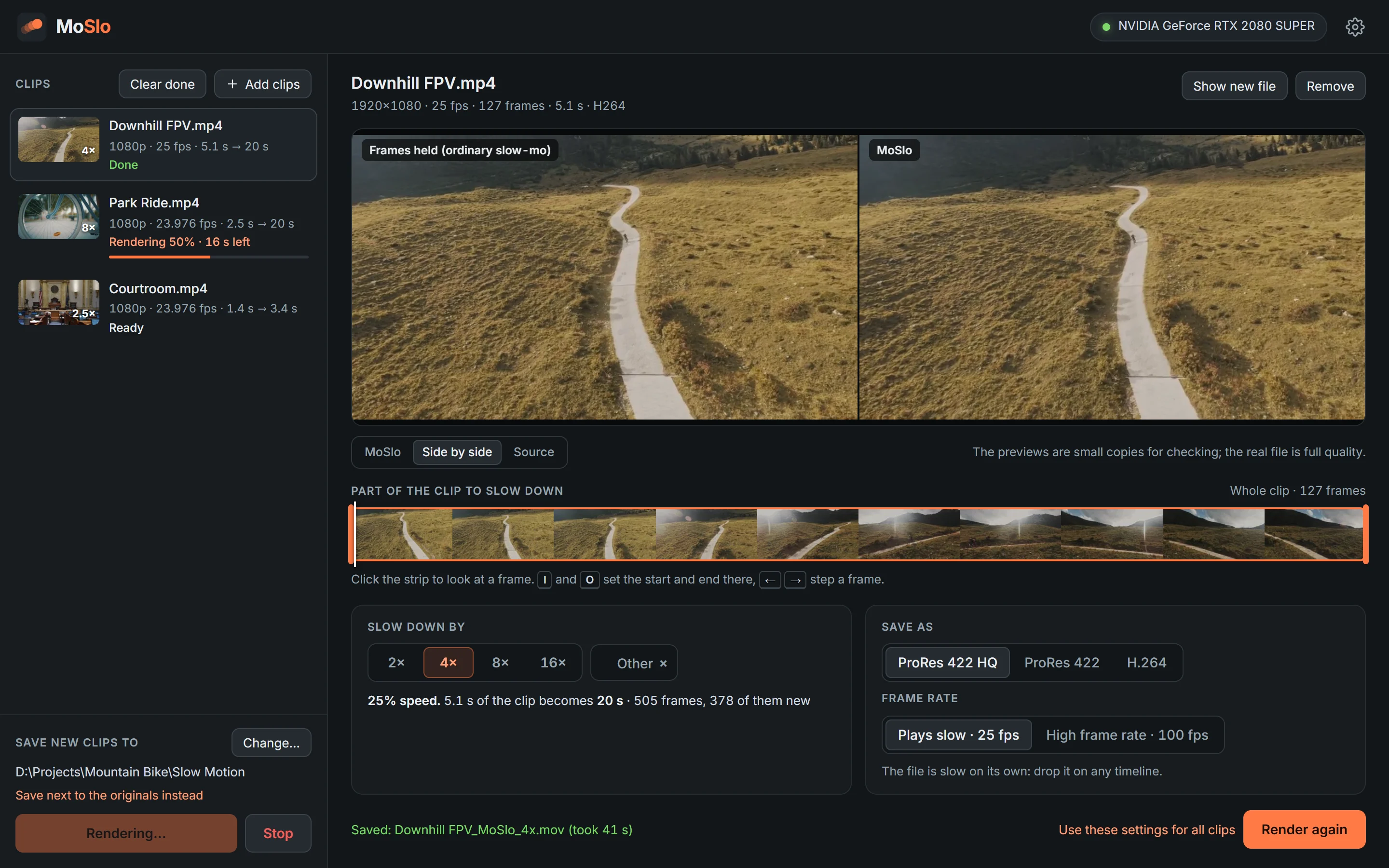
The same five-second drone shot at 25 frames a second, slowed to a quarter of its speed. On the left, each frame is held four times, the way an editor slows a clip it has no extra frames for. On the right, MoSlo made the three frames between every pair.
What it looks like
Your clips down the left. Pick one, choose how much slower and which part, and render.
Any amount slower
2×, 4×, 8× and 16× are one click; type anything from 1.1× to 32× for the rest. It tells you the new speed and how long the result will be before you start.
Just the part you need
Drag the handles on the filmstrip, or press I and O
on a frame, to slow only that stretch. Shorter renders, and nothing wasted on the bits you'll cut.
Ready for your edit
Saves ProRes 422 HQ by default, or ProRes 422 or H.264. The new file plays slow on its own, so it drops onto any timeline. Or save it at the high frame rate and slow it in your editor.
Your original stays put
A new file goes next to the original (or one folder you choose), named
Clip_MoSlo_4x.mov. Nothing is ever replaced.
Check before you use it
When a render finishes, the window plays it, and Side by side puts it next to ordinary slow motion so you can see what you gained.
Long clips, 4K, no fuss
It works through a clip in small batches, so a long or 4K clip doesn't fill your drive with temporary frames. A whole list renders one after another while you get on with something else.
On your own PC
No account, no upload, no credits. The AI runs on your graphics card through Vulkan, so NVIDIA, AMD and Intel all work.
The AI inside
RIFE, an open-source frame interpolation model (version 4.26), the same kind of technique the online slow-motion tools use. Your original frames pass through untouched.
Flickering lights
Shoot at a high frame rate under ordinary indoor lights and the picture pulses: bands of light that swap bright and dark on every frame. Turn on Reduce flicker and MoSlo evens them out, on its own or together with a slowdown.
No smear
The usual fix, a copy of the clip one frame later at 50% on the track above, blends every frame with the next, so anything moving gets a double image. MoSlo never blends frames: it only corrects how bright each part of the picture is.
Follows the movement
It lines each frame up with the ones either side, following the camera and the people in the shot, so a moving edge isn't mistaken for flicker.
Measured
On ten indoor 6K shots, the flicker came down by 80 to 90% in every one, about as much as the 50% trick, while moving hands and hair stayed as sharp as the original.
Cuts are fine
A clip with several shots in it is handled shot by shot, so one shot's light never leaks into the next.
Full quality kept
Without a slowdown, 10-bit footage stays 10-bit, and the colour tags are kept. The
new file is Clip_MoSlo_deflicker.mov, next to the original.
Where it struggles
A light that blows out to pure white can't be brought back, and very fast moves through mixed light can leave a faint wobble at edges.
In Premiere Pro
The MoSlo panel slows a clip down, or reduces its flicker, straight from your timeline and puts the result back in your project. MoSlo does the rendering, so the app needs to be open.
Setting it up, once
- Install MoSlo. The panel comes with it.
- Make sure the Adobe Creative Cloud app is open and signed in.
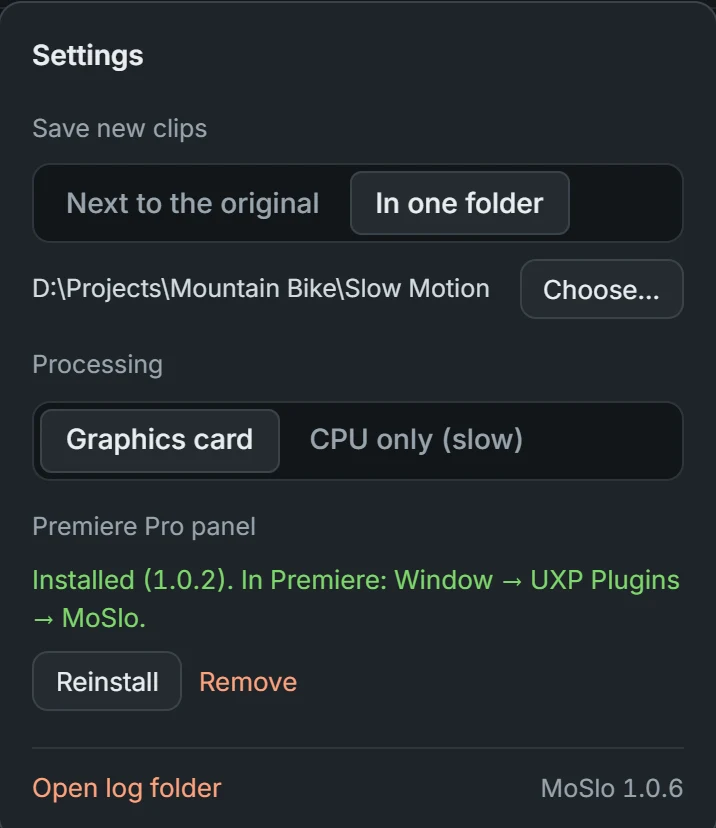
- In MoSlo, click the gear (top right), then Install in Premiere.
- Restart Premiere, then Window → UXP Plugins → MoSlo. Dock it anywhere.
Using it
- Click a clip in your timeline.
- Pick how much slower (or Off), tick Reduce flickering lights if it needs it, pick the format, and click the button.
- Only the part of the clip you've used is rendered. The new clip goes into a MoSlo bin and onto the first empty track above the original, starting in the same place. Your original isn't touched.
The clip needs to be at 100% speed. If you've already changed its speed in Premiere, set it back first (right-click → Speed/Duration).
What works best
Making frames that were never shot is guesswork, very good guesswork. Some shots are easier to guess than others.
Great
Drones and FPV, pans and tracking shots, sport, people walking or running, water, anything moving across the frame.
Harder
Spinning wheels, spokes and propellers are hard for any interpolation tool: when a wheel turns about one spoke between frames, nothing can tell which spoke went where. Very fast blurred motion and things passing in front of each other can warp a little too. 2× or 4× hides more than 16×.
| Reads | MP4, MOV, MXF, MKV, AVI, MTS and the rest: H.264, H.265, ProRes, XAVC and other ffmpeg formats (built in). Camera raw (BRAW, R3D) isn't read; make a ProRes of it first. |
|---|---|
| Writes | ProRes 422 HQ or ProRes 422 (.mov, 10-bit), or H.264 (.mp4). Colour tags such as Rec.709 are kept. |
| Cuts | A cut inside the clip gets morphed across. Trim to one shot first. |
| Sound | Not included in the new file. |
| Log and 10-bit | The in-between frames are made in 8 bits, so slow your clip down after grading, or grade it lightly. |
Installing MoSlo
Windows will warn you on first run
The installer isn't code-signed. A certificate costs a few hundred dollars a year, which is hard to justify for
something shared with friends. Click More info, then Run anyway. You'll only see it once.
It installs under your own account, so there's no admin password, and it uninstalls from Settings → Apps.
A graphics card makes it fast
Any NVIDIA, AMD or Intel graphics with an up-to-date driver works. The pill at the top of the window shows which one MoSlo found. Without one it still works on the processor, just much more slowly.
Settings and the log are kept in
%LOCALAPPDATA%\LutzStack\MoSlo (gear → Open log folder). If a clip fails, the reason is under the
controls. Built on rife-ncnn-vulkan
and the RIFE model (MIT licence) and ffmpeg. Premiere Pro is Adobe's trademark.