/ tools / proxie

Point it at a day's camera cards and walk away. Proxie finds every clip in every folder, works out which log profile each camera shot in, and writes editing proxies that are already colour-corrected to Rec.709, in a Proxies folder laid out exactly like your footage.
What it looks like
Source folders on the left, the queue in the middle, and a before-and-after of whichever clip you click on the right.
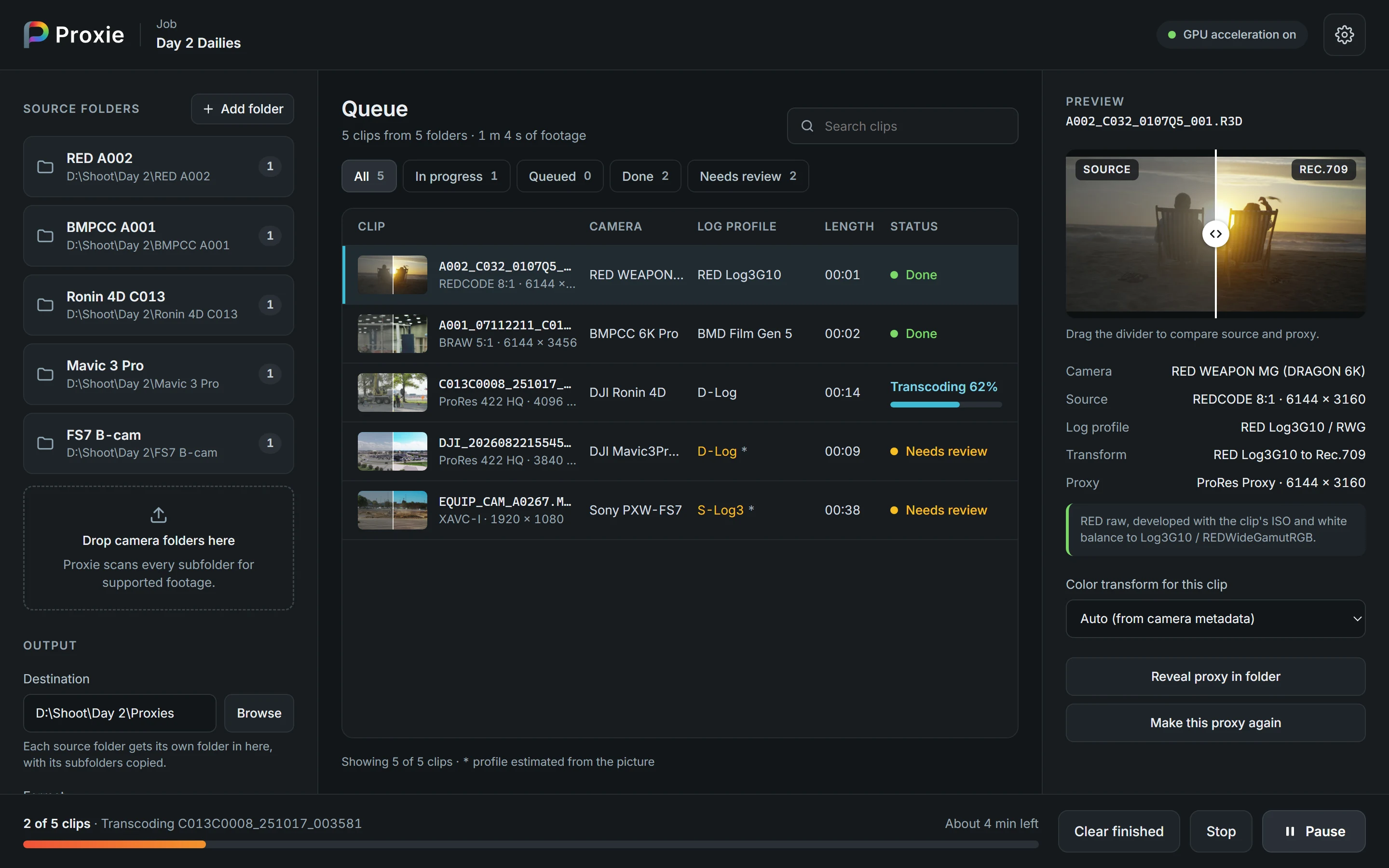
Whole cards at once
Drop camera folders on the window or click Add folder. Every subfolder is
searched, so a card's PRIVATE\M4ROOT\CLIP or a RED .RDC folder needs no digging.
Proxies your editor relinks
Same file names, same timecode, same frame rate and every audio track the camera recorded, so Premiere and Resolve attach them to the originals without fuss.
Pause means pause
Pause freezes the work exactly where it is and Resume carries on. Stop throws away only the clips in progress. Run the same folders again later and it makes only what's missing.
Survives a crash
The queue saves itself as it goes. Close Proxie halfway through a big batch, or have it crash, and the next launch shows the same job, ready to carry on. Half-made proxies are made again.
Tries again by itself
A clip that fails waits a few seconds and goes again, the last time without the graphics card. A broken take can be taken out of the queue with one click, without starting over.
Fast where it counts
RED raw is debayered on the graphics card, Blackmagic RAW and RED are decoded straight at the size you need, and two clips run at a time (up to six in Settings).
Stills come along too
Photos on the card go to the same folders as full-size PNGs, at the camera's own resolution. PNGs are copied; JPEG, TIFF, HEIC and camera raw (DNG, CR3, NEF, ARW and more) are converted, turned upright, with their colours as shot. Windows for now; the Mac version gets it next.
Burn-in when you want it
One tick adds the clip name bottom left and running timecode bottom right, for review copies.
Nothing leaves your PC
No account and no upload. It reads your footage and writes proxies, and never changes a camera file.
The colour, done for you
Log footage looks grey and flat until it's graded, which makes it miserable to cut with. Proxie reads which log each camera used and converts it with the maker's published maths, so your proxies look like a finished picture from the first frame.
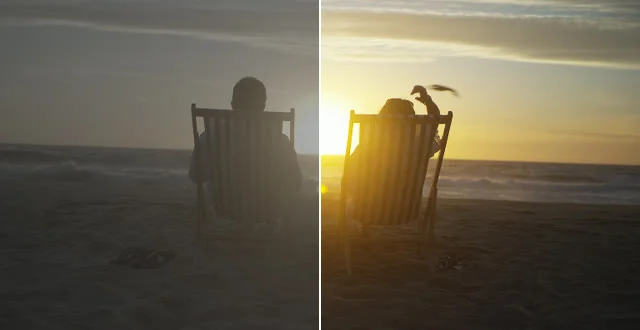 LOG3G10REC.709
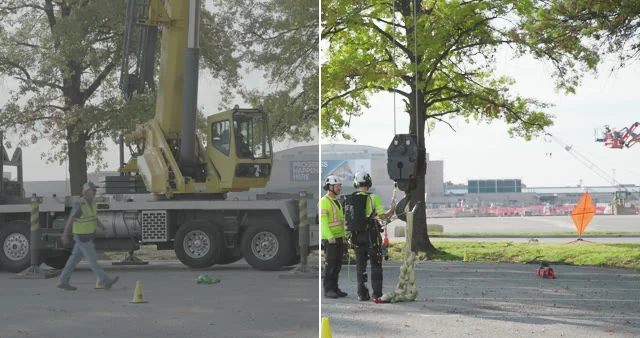 D-LOGREC.709
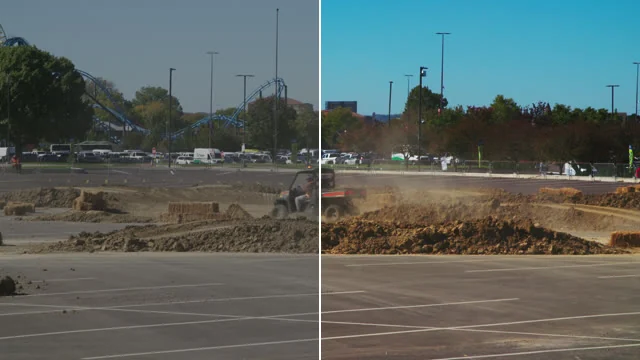 S-LOG3REC.709
 FILM GEN 5REC.709
First, the camera's own word
Blackmagic RAW and RED say what they are. Sony writes its gamma into an XML block, DJI into its own metadata track, and Canon, Panasonic, ARRI, Fujifilm, Nikon and Apple leave the profile's name in the file.
Then, the picture
When a file says nothing, Proxie measures a few frames. Lifted blacks, low highlights and little colour means log, and the camera's usual profile is used. The clip is marked Needs review so you can check it. Footage that already looks like Rec.709 is left alone.
Your call, any time
Pick a different transform for any clip from the preview panel and the preview updates on the spot. A brightness nudge in Settings shifts every clip up or down if you like your proxies brighter.
A light touch per camera
Too punchy? Adjust look has Exposure, Contrast, Saturation and Warmth. It applies to every clip from that camera in the same folder, so one tweak fixes a whole card. Finished clips can be made again with the new look in one click.
Profiles it knows
- ARRI LogC4
- ARRI LogC3
- Sony S-Log3 / S-Gamut3.Cine
- Sony S-Log3 / S-Gamut3
- Sony S-Log2
- Canon Log 3
- Canon Log 2
- Panasonic V-Log
- Blackmagic Film Gen 5
- RED Log3G10
- DJI D-Log
- DJI D-Log M*
- Fujifilm F-Log2
- Fujifilm F-Log
- Nikon N-Log
- Apple Log
- HLG
- Rec.709 (leave as is)
* DJI has never published the D-Log M curve, only a LUT, so that one is a close approximation. Every other transform uses the manufacturer's own formulas.
Cameras and formats
| RED (.R3D) | RED's own decoder is built in. The heavy lifting runs on an NVIDIA or AMD graphics card,
about six times faster than the processor alone (it still works without one). A take that spans
_001.R3D, _002.R3D… becomes a single proxy. The clip's ISO and white balance are used,
including changes saved in an RMD sidecar. |
|---|---|
| Blackmagic RAW (.braw) | Blackmagic's own decoder is built in. |
| ProRes, H.264, H.265, XAVC | MOV, MP4, MXF and MTS files from Sony, Canon, Panasonic, DJI, ARRI, Fujifilm, Nikon, iPhone, GoPro and the rest, through ffmpeg (built in). |
| Stills | JPEG, PNG, TIFF, BMP, WebP, HEIC and camera raw photos (DNG, CR3, CR2, NEF, ARW, RAF, ORF, RW2 and others, through LibRaw). Made into PNGs at full size; raw and 16-bit TIFF stay 16-bit. Untick Convert stills to PNG to leave them out. |
| Not supported | ARRIRAW, Canon Cinema RAW Light and Nikon N-RAW. They show up as Can't read and are skipped. |
Where the proxies go
A Proxies folder next to the first folder you add, with each source folder and all its subfolders copied inside it. Or anywhere you like: click Browse.
D:\Shoot\Day 2\
├── RED A002\A002_C032_0107Q5.RDC\A002_C032_0107Q5_001.R3D
├── FS7 B-cam\XDROOT\Clip\EQUIP_CAM_A0267.MXF
└── Proxies\
    ├── RED A002\A002_C032_0107Q5.RDC\A002_C032_0107Q5_001.mov
    └── FS7 B-cam\XDROOT\Clip\EQUIP_CAM_A0267.mov
Add a camera card straight from its drive letter and the proxies go in your Videos folder instead, so nothing is ever written onto a card.
| Format | ProRes 422 Proxy (.mov) by default. Also ProRes 422 LT, DNxHR LB (.mxf) and H.264 (.mp4, encoded on the graphics card when there is one). |
|---|---|
| Size | Full (the camera's own size) by default, 4K (fits inside 4096 × 2160) or 1080p (fits inside 2048 × 1080). Never upscaled, never stretched. |
| Names | The camera's file names, so your editor can match them. Untick Match source file names to add
_proxy instead. |
| Folders | Untick Mirror source folder structure to put every proxy straight into the destination. |
Installing Proxie
Windows will warn you on first run
The installer isn't code-signed. A certificate costs a few hundred dollars a year, which is hard to justify for
something shared with friends. Click More info, then Run anyway. You'll only see it once.
It installs under your own account, so there's no admin password, and it uninstalls from Settings → Apps.
On a Mac, macOS needs one extra click the first time
Open the disk image and drag Proxie onto Applications. The app isn't signed with an Apple developer
account, so the first time you open it macOS says it can't check it: click Done (not Move to Bin).
Then open System Settings → Privacy & Security, scroll down to the line about Proxie, click
Open Anyway and enter your Mac password. From then on it opens normally.
The first time it reads a camera card or a folder on your Desktop, macOS asks once whether Proxie may: click
Allow. On a Mac the graphics side runs on Apple's media engine, and camera cards' proxies go in your
Movies folder unless you choose somewhere else.
Keep your camera originals
Proxie only ever reads your footage. Still, check the proxies before you wipe a card.
Settings and the log are kept in
%LOCALAPPDATA%\LutzStack\Proxie on Windows and ~/Library/Application Support/LutzStack/Proxie
on a Mac (gear icon → Open log folder). If something fails, select the
clip: the reason is under its buttons. Includes the RED R3D SDK and Blackmagic RAW SDK libraries, used under their
makers' licences: the terms are in the Windows installer and in License.txt on the Mac disk image. RED and
Blackmagic RAW are their owners' trademarks.